
Contact Sheet Guide
Updated: Aug 13, 2025
If you’re comping more than one shot, chances are you’ve made a Contact Sheet manually in Nuke. And yeah—it works. But if you’re doing this regularly, or on sequences with lots of shots? It gets old fast.
That’s where a bit of Python can completely change the game.
In this guide, I’ll walk you through a simple custom tool I built to create contact sheets automatically in Nuke. Whether you want to preview keyframes, compare looks, or just keep your work organized, this is a lightweight way to make your daily workflow smoother.
No fancy UI, just clean, readable code and something you can plug straight into your scripts.
Why Even Bother?
If you've ever:
Copied and pasted a bunch of FrameHold nodes
Aligned them manually with dots or ContactSheet
Forgot to label shots or messed up the order
…you’ll see why a tool like this makes sense.
This script does it all for you:
Scans selected Read nodes
Picks the middle frame (or any frame you want)
Labels each shot with a Text node
Lays it all out in a ContactSheet
Auto-calculates rows and columns based on how many inputs
Here's what it looks like in Nuke:
↪ UI View

↪ Output
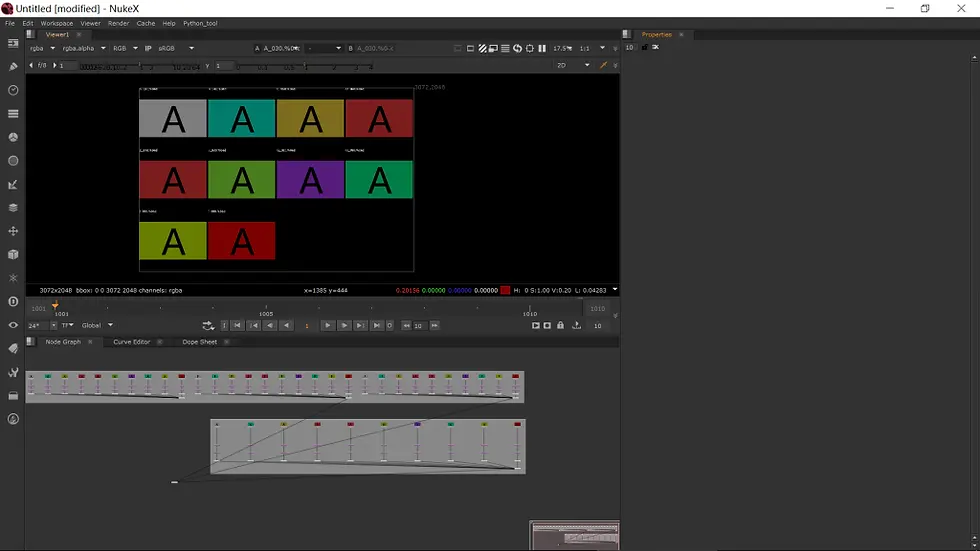
This tool is deceptively simple — but once it’s part of your pipeline, you’ll wonder how you lived without it. It’s especially helpful when:
Reviewing dailies
Building lookdev comparisons
Organizing slapcomps
Pitching ideas to a VFX sup
This script is just one example of how a little Python can go a long way in Nuke. It’s not about reinventing the wheel — it’s about making your tools work with you, not against you.
Happy comping! ✌️


